About Matt Williams

Matt is currently studying for his PhD in particle physics at the University of Warwick, UK. For Volumes of Fun he manages the website as well as looking after the build system, Linux porting and continuous integration for PolyVox. Follow him on Google+.

Python bindings for PolyVox preview

As part of the next release of PolyVox, we’re going to have the first Python bindings available and supported as well as preliminary support for C♯ bindings. This will allow easy integration of voxels into the technologies you’re already using.

History

For a long time now (at least 4 years) we’ve had some form of Python bindings available for PolyVox, created via the SWIG tool. If you were paying attention in those days, you would have seen that the bindings were often broken or even disabled from building completely. This was largely due to the fact that PolyVox was a fast-developing piece of software without a stable API. We didn’t want to slow down the development of new features by having the impedance of also having to update the bindings.

However, since we starting making proper numbered releases (beginning with 0.2.0 last year) the API has settled down and we’re making promises about how much (or little) it will change. This makes it a much more suitable target for building bindings to other languages.

Current status of Python bindings

My main target for the next release of PolyVox (0.3 when it’s out) has been improving and polishing the bindings for Python. In addition to the Python bindings, I have also enabled the building of C♯ bindings for those who would like to try those out too. The Python bindings are better supported however (we have nightly tests run on them, documentation and a demonstration example) and are less liable to change.

If you’re interested in taking a look, then I’ve uploaded a first draft of a section documenting the Python bindings which introduces the bindings and goes through a short code example. That short example is expanded as a full example in the usual example location, PythonExample.py, which renders a blocky sphere to the screen using Python, PyOpenGL and PyGame without a single line of C++ needing to be written.
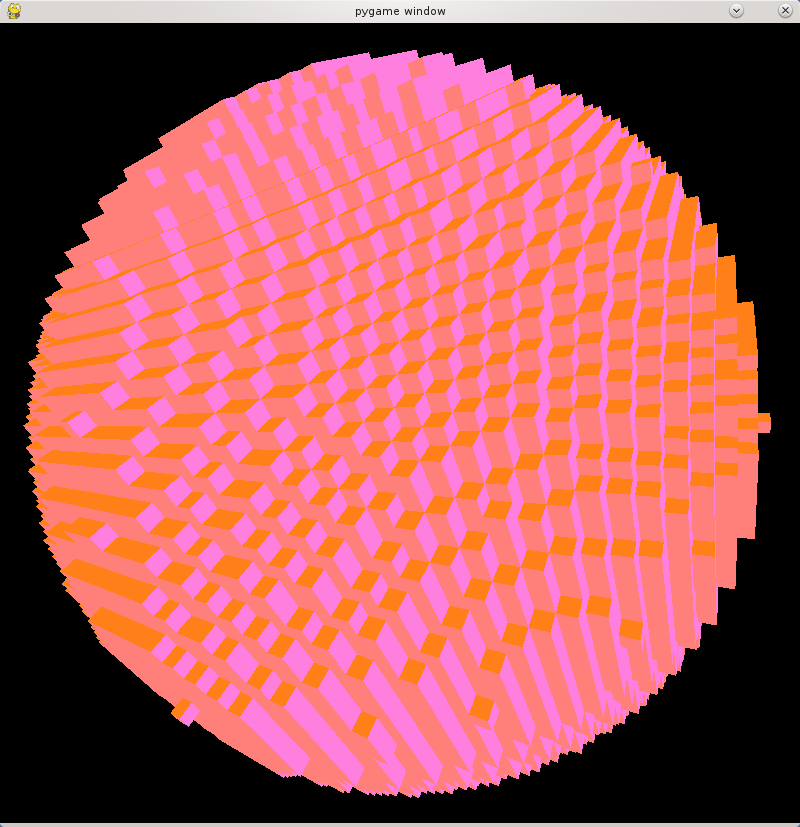
Voxel sphere rendered by Python

A voxel sphere rendered though PyOpenGL

For example, creating a volume is as simple as

import PolyVoxCore as pv

r = pv.Region(pv.Vector3Dint32_t(0,0,0), pv.Vector3Dint32_t(63,63,63))
vol = pv.SimpleVolumeuint8(r)

You can set the value of any voxel with a single call like:

vol.setVoxelAt(x, y, z, 10)

and you can extract a polygon mesh to be passed to your 3D engine of choice with

mesh = pv.SurfaceMeshPositionMaterialNormal()
extractor = pv.CubicSurfaceExtractorWithNormalsSimpleVolumeuint8(vol, r, mesh)
extractor.execute()

The unusually long names for the classes is an artefact of SWIG being able to represent all the varieties of C++ template instances. You’ll also notice that the API is not very Pythonic at present. I’m trying to get all the functionality working before adding another layer of Pythonicness.

All of the above is already in the develop branch of Git already so feel free to try it out. If you have any question please do ask in the comments below or in the forums.

In a future post I’ll detail some of the technical challenges I’ve faced to get all of PolyVox’s functionality working in both Python and C♯ via SWIG.

Share

PolyVox 0.2.1 released

As a late Christmas present to you all we’ve just released version 0.2.1 of PolyVox. This is a bug fix release to PolyVox 0.2.0.

This release includes the following bug fixes:

  • A compilation error on VS2008 (commit)
  • One of the sampler peek functions would check in the wrong direction before moving (commit)
  • SimpleVolume and LargeVolume had a problem with negative positions (commit, commit)
  • The LowPassFilter test was using the wrong kernel size (commit)

Apart from those bug fixes there are no new features and so should be completely safe to upgrade to.

You can get the details for downloading the source from the PolyVox download page or download directly from these links:

If you’re following us on Git, the 0.2.1 is now what is represented on the master branch.

Share

New home for PolyVox git repo

The source code for PolyVox is now located at BitBucket rather than its previous home on Gitorious. There are a few reasons we wanted to move hosting provider. Primarily we wanted an easier way of keeping track of planned features without messy email threads between David and myself and better bug tracking than our current forum-based method.

BitBucket offered everything we needed and since we were already using it for its unlimited private repos, it made sense to move PolyVox there too.

While we will be using the issue tracker to keep track of features and bugs, we will keep using the forum for most discussions. Feel free so submit any simple/small bugs to the tracker directly e.g. for compile errors etc.

To switch your local clone to follow the new repo on the command line just do the following:

# First check where you're currently pointing
$ git remote -v
origin  git://gitorious.org/polyvox/polyvox.git (fetch)

# Change the 'origin' remote's URL
$ git remote set-url origin https://bitbucket.org/volumesoffun/polyvox.git

# Now, it should look like
$ git remote -v
origin  https://bitbucket.org/volumesoffun/polyvox.git (fetch)

Otherwise, you can just use your GUI tool to change the repo URL to be https://bitbucket.org/volumesoffun/polyvox.git. You should now be able to carry on doing git pull as if nothing had changed.

Share

Some PolyVox Updates – Git and CMake

We’ve been very busy here over the last few weeks with Voxeliens related things so I though I should send an update on what’s been going on in the area of PolyVox. There’s been two main changes recently which I hope will help make things easier for people as we move forward.

CMake Folders

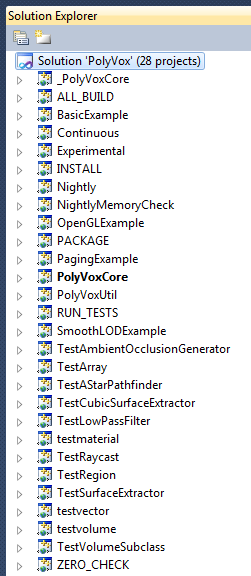
The first thing we’ve done is to start using a nice little feature of CMake to make working in Visual Studio a little nicer. Before this change, the Solution Explorer looked like:

Obviously, this is a little hard to work with since all the tests, as well as internal targets like ZERO_CHECK and _PolyVoxCore are included in the list. What would be ideal is if it were possible to organise the targets into a hierarchy which matches how the code is logically organised. I found a blog post showing how CMake can do this. First of all, you must enable a global CMake property to turn on this feature.

set_property(GLOBAL PROPERTY USE_FOLDERS ON)

Then, for each CMake target, you mush set a property which defines the “folder” in which it will appear. For example, for the PolyVoxCore target, we add the following line to its CMakeLists.txt file:

set_property(TARGET PolyVoxCore PROPERTY FOLDER "library/PolyVoxCore")

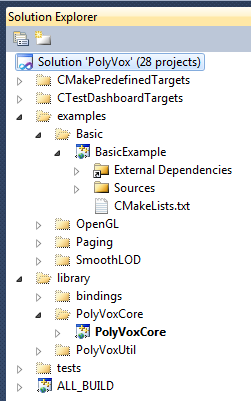
Once these are added to all the targets you want to categorise, you will see something more like this in Visual Studio:

Which has put everything in a more logical place. This was added to Git a few weeks ago in this commit.

Git Branching Model

The second “feature” we’ve recently added is a new way of working with our Git repository. Up until now, we’ve simply done all work in the master branch (perhaps with the occasional local topic branch) and so it’s sometimes been the case that the version of the code in the Git repo hasn’t been in a compilable state. As we’re currently working towards making a proper release of PolyVox, we decided that we should be more structured with our usage.

I’d heard good things about Vincent Driessen’s “successful Git branching model” and after reading it through we decided that it would be a good model to follow. Even better, he provides a cross-platform set of Git extensions called git-flow which make the whole process painless.

As of today, we will be using the new branching model. The master branch will now only contain released versions of the code and if you want to get the latest development version, you’ll have to check out the develop branch. When browsing the web interface at Gitorious, you’ll see that you can switch between branches by clicking the name in the grey box at the top or in the right-hand panel when browsing the source tree.

When it comes to release time, it’s simply a few commands to merge the develop branch into the master branch and tag the commit.

What this means for users is that we’ll be making more regular, stable releases and the git repository will be in a much more stable state for you to use.

Share

Voxeliens shortlisted for the Indie Dev Showcase

We’re very happy to announce that our début game Voxeliens has been selected as one of the finalists for the Indie Dev Showcase at the upcoming Develop Conference in Brighton, UK. This means that over two days of the conference we’ll be among the other 9 finalists showing off our game to public, press and industry professionals.

We will be provided with a stand for people to come by and talk to us and play the game on the 11th and 12 of July. So if you’re going to be at the conference please come by and say hello – we’re a friendly bunch :)

Out of all the games that have been shortlisted, one will be selected as the overall Showcase Winner and one will be chosen as the People’s Choice via a ballot during the conference.

The Develop conference is one of the largest European game developer and publisher conferences and runs for three days from the 10th to the 12th of July. As well as providing talks and an expo floor for the professionals in the industry there is also a day and a half of talks aimed solely at the indie game developer community.

Share

Voxeliens Linux port update – ABIs and compatibility

I’ve been hard at work over the last few weeks to iron out some of the main blockers to the Linux port of Voxeliens. One of the major hurdles I’ve been coming up against is the the dangerous area that is ABI compatibility on Linux.

ABI compatibility

For those that don’t know, an ABI (application binary interface) is what allows you to use existing libraries of code in your application, whether they’re things you’re in control of (like our PolyVox library) or system libraries (like glibc or the C++ standard library). For the purposes of the discussion here, an ABI is defined by the symbols that a library contains where symbols are things like functions. As a library evolves over the years they will add functions and each time a release of the library is made with new symbols the library ABI version will increase. Most library developers (and this is particularly true of system libraries like glibc) will promise to never remove any symbols from their libraries which means that an application built against an old version of glibc will still work when run on a new system as all those symbols will still be present (this is called forward compatibility).

The opposite cannot be said to be true. If you build an application on the latest greatest version of your favourite Linux distribution it will freely try to use newer symbols in its dependent libraries. If you then copy that executable to an older distribution and try to run it, it will balk and complain that it can’t find the required symbols. There are tricks one can play to trick the compiler into only using symbols from an old ABI version but the simplest way to achieve the goal is to install an old distribution in a virtual machine and compile all your code there.

This is what I’ve been doing for the past few weeks. I created a VM with a 32 bit installation of openSUSE 11.1 (released December 2008) and have recompiled Voxeliens and all its dependencies in the most minimal way I can. The reason I am doing this in a 32 bit VM rather than a 64 bit one is that 32 bit binaries (technically i686) are compatible with 64 bit operating systems (technically x86_64) whereas the inverse is not true. Ideally these binaries built in the 32 bit VM will work on any Linux OS released in the last 3 or 4 years regardless of whether it’s 32 or 64 bit. This will be one of the main things we’ll need testers for when the time comes.

Bundling libraries

For low level system libraries there’s little choice apart from building against an old version. However, for higher level libraries we have more options. For some libraries with liberal open source licenses we can simply statically link them which essentially involves bundling the library’s code directly into the final executable – thereby avoiding and ABI problems. Any library under a license like the GPL or LGPL, however, cannot legally be statically linked and so the simplest solution here is to include the library file along with the game and tell the executable to use the bundled version rather than any provided by the system.

Shaders are complete

David’s done some excellent work to port all the shaders over to GLSL. In the last update you saw that there was nothing there but flat colours but now everything, including shadows and lighting is working.

What’s left to do?

So now that the building of a portable version of Voxeliens is complete, there’s a few areas that need finishing before it can be released:

  • Sound. The state of sound output on Linux is a little confusing and not as simple as on Windows. The main problem we’re encountering is that Phonon (the sound API from KDE/Qt), while generally excellent does not provide a sound mixer and so only allows one sound to be played at once. In Voxeliens we often have multiple explosions, laser shots and the music all playing and so we’re investigating using SDL_mixer to mix our sound for us.
  • There’s still some checks to be done to ensure that the X11 keyboard handling is working as it should be.
  • Finally I need to analyse the distribution package, remove debug symbols, streamline running the application etc.

Once these are sorted, it will be ready for testing among a wider audience and we’ll put out a request for beta testers nearer the time.

Share

Voxeliens Linux port progress report

Following on from David’s work to port the shaders to GLSL, I’ve been working over the last week or so to get the code compiling for the Linux port. Fortunately Voxeliens is built on top of a number of fantastic open-source projects such as OGRE and Qt which work perfectly on Linux already. As far as our own code, Voxeliens make extensive use of our PolyVox library which I have all along been building and testing on Linux.

Since all our dependencies were working fine, it simply became a case of getting the Voxeliens code itself compiling. This was largely a trivial job, with the bulk of the work involving fixing incorrect case in C++ includes and media files. The largest single change that had to be made was to the keyboard handling. Qt doesn’t provide access to the low level keyboard APIs on Windows or Linux so I had to write some native X11 code to complement the windows.h code we already had.

Voxeliens on LinuxWe still have some work to do on the GLSL shaders to get shadows working and to ensure compatibility with OpenGL 2.1 (since that seems the best target for Linux) and then it’s mostly the work to get it packaged up for distribution across all the different flavours and versions of Linux. Sorting out shared libraries and dependencies is going to be the most amount of work. We’ll be putting out a call for testers once it’s nearer to release to hammer out any problems in this area.

I’ll write up a more technical, in-depth post after the release about the porting process for those who are interested.

Share