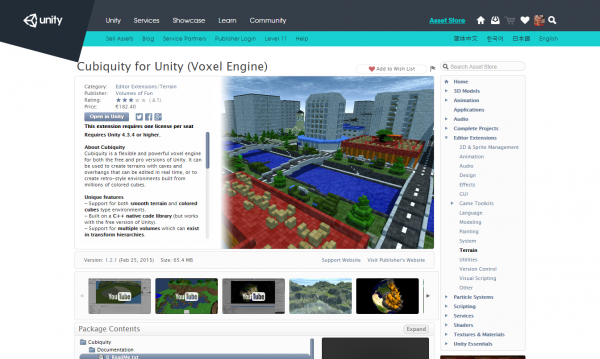
Unity3D integration update

The last few weeks have seen some more work on integrating Cubiquity with Unity3D. The screenshot in the last blog post was actually a single large mesh which made it difficult to modify, but it’s now being properly broken down into a number of small meshes which can be updated individually when their voxels change. So everything is a lot more dynamic now.

Physics objects bouncing around a voxel terrain.

The meshes are also now fed into Unity’s physics system so that they can be used as colliders. Also raycasting functionality has been exposed and these capabilities have been combined in the extremely simple ‘game’ you can see in the screenshot below. The tank can be controlled by the keyboard while the mouse aims and shoots.

The tank is a physics object so you can shoot holes in the ground and then fall into them.

So a lot of stuff is starting to come together, though I must emphasise that it’s still very much a proof-of-concept. The main issue is that we are still new to Unity, and so not exactly sure how it should be integrated. Currently there is only an interface for programmers as we need to think how this gets integrated with Unity’s edit mode.

Anyway, we’re thinking about releasing a ‘preview’ version (for free) in the next couple of weeks to get some initial feedback. I just need to look at how this stuff is supposed to be packaged up, as well as polishing a few bits of the system. Stay tuned!

Share

Unity integration – finally some progress!

We’ve been talking about Unity integration for months, but today I can finally prove that we’re working on it :-) The screenshot below shows a simple terrain loaded by Cubiquity, with the data then passed through the plugin interface and rendered by Unity:

Unity3D Cubiquity integration

I had never worked with Unity before attempting this so there has been a lot to learn. I knew that Unity used .NET for scripting and that ‘C++ support’ was only available in the Pro version, but I had assumed that once you had this you could write your games in C++ using Unity as a library. But as anyone who has actually used it knows, that’s not how it works at all.

The way it works instead is that C++ code can be complied to plugins which can then be loaded at runtime. One limitation here is that you have to provide a C API (or at least avoid name-mangling issues) whereas Cubiquity is written in nice templatised C++. So some time has had to be spent creating a C interface to this. Actually there are other options such as C++/CLR, but the C API seemed like it would have the most value in other scenarios.

On the plus side, it turns out that loading plugins does actually work in the free version of Unity (with limitations) so those users will still be able to try out the system when we produce a test version.

Anyway, it’s very much a proof of concept at the moment but it does look like it’s going to work. I can see now that it will take a little longer than we originally thought but I still hope we’ll have a lot more to show off in the coming months.

Share

Python bindings for PolyVox preview

As part of the next release of PolyVox, we’re going to have the first Python bindings available and supported as well as preliminary support for C♯ bindings. This will allow easy integration of voxels into the technologies you’re already using.

History

For a long time now (at least 4 years) we’ve had some form of Python bindings available for PolyVox, created via the SWIG tool. If you were paying attention in those days, you would have seen that the bindings were often broken or even disabled from building completely. This was largely due to the fact that PolyVox was a fast-developing piece of software without a stable API. We didn’t want to slow down the development of new features by having the impedance of also having to update the bindings.

However, since we starting making proper numbered releases (beginning with 0.2.0 last year) the API has settled down and we’re making promises about how much (or little) it will change. This makes it a much more suitable target for building bindings to other languages.

Current status of Python bindings

My main target for the next release of PolyVox (0.3 when it’s out) has been improving and polishing the bindings for Python. In addition to the Python bindings, I have also enabled the building of C♯ bindings for those who would like to try those out too. The Python bindings are better supported however (we have nightly tests run on them, documentation and a demonstration example) and are less liable to change.

If you’re interested in taking a look, then I’ve uploaded a first draft of a section documenting the Python bindings which introduces the bindings and goes through a short code example. That short example is expanded as a full example in the usual example location, PythonExample.py, which renders a blocky sphere to the screen using Python, PyOpenGL and PyGame without a single line of C++ needing to be written.

Voxel sphere rendered by Python

A voxel sphere rendered though PyOpenGL

For example, creating a volume is as simple as

import PolyVoxCore as pv

r = pv.Region(pv.Vector3Dint32_t(0,0,0), pv.Vector3Dint32_t(63,63,63))
vol = pv.SimpleVolumeuint8(r)

You can set the value of any voxel with a single call like:

vol.setVoxelAt(x, y, z, 10)

and you can extract a polygon mesh to be passed to your 3D engine of choice with

mesh = pv.SurfaceMeshPositionMaterialNormal()
extractor = pv.CubicSurfaceExtractorWithNormalsSimpleVolumeuint8(vol, r, mesh)
extractor.execute()

The unusually long names for the classes is an artefact of SWIG being able to represent all the varieties of C++ template instances. You’ll also notice that the API is not very Pythonic at present. I’m trying to get all the functionality working before adding another layer of Pythonicness.

All of the above is already in the develop branch of Git already so feel free to try it out. If you have any question please do ask in the comments below or in the forums.

In a future post I’ll detail some of the technical challenges I’ve faced to get all of PolyVox’s functionality working in both Python and C♯ via SWIG.

Share

A quick update and some new screenshots

I thought I’d write a quick update on where we stand with our various projects as I feel like we’re juggling a dozen things at a time here :-) I’ve thrown in some pictures to spice it up a bit, but if you want to see these when they are fresh then be sure to follow us on Twitter.

Cubiquity

Since the first tech demo we have implemented threading in Cubiquity so that surface extraction can be performed in the background. This improves loading times and responsiveness but currently it only works with PolyVox’s SimpleVolume, which limits the amount of volume data we can load at a time. I’ve also done some work overhauling the shaders so that normal mapping is now supported, and hopefully this will get improved further in the future.

Normal mapping the voxels in Cubiquity

PolyVox

The most significant addition to PolyVox is that the LargeVolume class now supports plugable compression code. We’ve also provided an implementation based on the miniz library. This works well for smooth terrain while the existing RLE compressor can be used for cubic ‘Minecraft style’ terrain.

Next up we need to improve the thread safety of the LargeVolume as this has been requested many times, and we’re starting to need it for Cubiquity (as mentioned above).

VolDat

We’ve received some feedback about the format and will do a proper post about this soon. The main issues raised are paging for very large volumes (probably beyond the scope of what we are aiming for here) and also an existing similar format (but it doesn’t make the slice data easy to visualise). We’ve also bee working on some test data sets which we will make available as part of an online archive. A couple of examples are below:

A ‘Build and Shoot’ map loaded into Cubiquity. Source data is here: http://www.buildandshoot.com/viewtopic.php?f=8&t=913

I wrote a program to create a Mandelbulb as these can be very large and still have fine detail. This one is only 512x512x512 though.

Unity3D

I downloaded Unity and had a play with it last weekend. It’s a really cool system, and I can see why it’s got such a big following as it makes development really easy. Integrating Cubiquity is a bit more difficult than I hoped as it turns out that plugin .dlls need to provide a ‘C’ interface (not C++) so we’re having to create a wrapper for Cubiquity. This takes a bit of time but shouldn’t be a big problem over all.

That will do for now – see you next time :-)

Share

VolDat: A standard format for exchanging volume data

One of the challenges which we face when developing a voxel engine is finding appropriate datasets to test with. For researchers working with mesh data there are a number of standard test models (Sponza, Dragon, etc) which have been used in hundreds of papers over the years, but our options for volume data are a lot more limited. There are some archives containing CT/MRI data but this is not appropriate for all usage scenarios.

Another challenge is the lack of a standard format for volume data, as this impedes our ability to pass data between different voxel applications as well as making the creation of the above mentioned volume data archive more difficult. The only real standard is DICOM, but this is very complex and heavily geared to the medical imaging industry rather than more general scenarios.

Therefore we are taking the initiative to create ‘VolDat’ as a standard format which we hope will be adopted by the various applications which work with volume data, and which will form the basis of our own volume data archive. This is not meant to replace an application’s own format, but instead to be an additional import/export option to promote interoperability.

The format itself is very simple, and is independent of the kind of data your voxels represent (you can use it for coloured cubes, Minecraft-style terrain, density fields for smooth terrain, etc). We basically store each volume as a series of images in a standard format, along with a text file describing some of the volume’s properties. This makes it very easy to understand the data even without reading the specification. For example, the image below shows one of the maps from Voxeliens in VolDat format being viewed in Windows Explorer:

When rendered in 3D it looks as follows (you should all know this having played Voxeliens!):

We’d really appreciate any feedback on this initiative or on the specification itself. The specifiaction is currently hosted on Google Docs which means anyone can add comments, and we can give edit permission if people want to contribute:

You can also provide feedback in the blog comments below or in this forum thread. We’ve also prepared a couple of (small) sample volumes which you can take a look at.

We will try and contact potentially interested parties regarding this initiative, and please do pass this on to anyone who could benefit from it. Thanks!

Share

Introducing: Cubiquity

Regular followers of our blog and forums will know that over the last few months we have done a lot of work integrating PolyVox with the Gameplay3D engine. We’ve also mentioned Unity3D and talked about creating a higher level framework to integrate PolyVox with such external game engines. Today we are pleased to officially introduce this technology as ‘Cubiquity’, and provide a very early demonstration of where we are going with it.
Cubiquity is a C++ library which is currently dependant only on PolyVox and which provides higher-level features such as a scene graph, level-of-detail, mesh management, and tools for manipulating volume data. Additionally we have developed ‘Cubiquity for Gameplay3D’ which basically connects Cubiquity to a Gameplay3D scene node so that volumes can be treated as first-class citizens in Gameplay3D. We also have Lua bindings so that Gameplay3D scripts can create and manipulate volume data.

The video below shows some of the features which are present in the tech demo. Cubiquity supports both cubic (hence the name!) and smooth voxel terrain but only the cubic terrain is being shown at the moment. The terrain in the video has a resolution of 512x512x256 voxels which are displayed as coloured cubes. A LOD system allows these cubes to be grouped together into larger cubes as they move into the distance. The terrain is fully dynamic and can be edited in real time (but note that lighting is baked in to this data set).

As mentioned, we have bindings to Lua which have allowed the whole tech demo to be driven by a simple script. This handles input, drives the rendering loop, and also exposes the entire Gameplay3D API meaning that (in theory) you can take this tech demo and build a game on it. In practice you might want to wait for a more mature version ;-)

You can download the tech demo at the link below. Please remember this is a very early version and, amoung other problems, whole system is currently running on a single thread. This causes pauses/hiccups when the terrain is being modified. The initial loading of the terrain is also slow and may take a minute of so.

Download: http://www.volumesoffun.com/downloads/Cubiquity/CubiquityTechDemo_ver_0_1.zip

We do not currently expect Cubiquity to be free, and will probably be targeting the professional indie market with it. Hopefully this will provide a way to support the development of PolyVox (which is also directly benefiting from the development of Cubiquity). That said, it is likely that we will continue to provide free tech demos which can be scripted to make your own games. We’re really still working out the details here.

I think there will probably be a lot of questions about all this, so ask away in the comments. Eventually we’ll get some proper information available on the website.

Share

Level-of-detail for cubic-style terrain with PolyVox

I just thought I’d post an update about some tests I did which worked out a lot better than I once expected. The idea here is to perform LOD for cubic-style meshes simply by downsampling the volume, such that in the distance a group of eight cubes is replaced by a single cube.

In the past I’ve said this wouldn’t work well as the transition would be too visually jarring, but recently I’ve seen a couple of screenshots from voxel engines which do indeed take this approach. I also talked about it with Matt over Christmas, and hacked together a test implementation last night.

The screenshots below start at full resolution and then gradually bring the LOD cut-off distance forward until all parts of the terrain are at the lower LOD. The transition is much less noticeable than I thought, and it practice it would also be much further from the camera.

This has all been implemented within our new framework built on PolyVox and Gameplay3D. Hopefully we’ll be able to provide a demo of this framework in the near future.

Share

PolyVox 0.2.1 released

As a late Christmas present to you all we’ve just released version 0.2.1 of PolyVox. This is a bug fix release to PolyVox 0.2.0.

This release includes the following bug fixes:

  • A compilation error on VS2008 (commit)
  • One of the sampler peek functions would check in the wrong direction before moving (commit)
  • SimpleVolume and LargeVolume had a problem with negative positions (commit, commit)
  • The LowPassFilter test was using the wrong kernel size (commit)

Apart from those bug fixes there are no new features and so should be completely safe to upgrade to.

You can get the details for downloading the source from the PolyVox download page or download directly from these links:

If you’re following us on Git, the 0.2.1 is now what is represented on the master branch.

Share

New home for PolyVox git repo

The source code for PolyVox is now located at BitBucket rather than its previous home on Gitorious. There are a few reasons we wanted to move hosting provider. Primarily we wanted an easier way of keeping track of planned features without messy email threads between David and myself and better bug tracking than our current forum-based method.

BitBucket offered everything we needed and since we were already using it for its unlimited private repos, it made sense to move PolyVox there too.

While we will be using the issue tracker to keep track of features and bugs, we will keep using the forum for most discussions. Feel free so submit any simple/small bugs to the tracker directly e.g. for compile errors etc.

To switch your local clone to follow the new repo on the command line just do the following:

# First check where you're currently pointing
$ git remote -v
origin  git://gitorious.org/polyvox/polyvox.git (fetch)

# Change the 'origin' remote's URL
$ git remote set-url origin https://bitbucket.org/volumesoffun/polyvox.git

# Now, it should look like
$ git remote -v
origin  https://bitbucket.org/volumesoffun/polyvox.git (fetch)

Otherwise, you can just use your GUI tool to change the repo URL to be https://bitbucket.org/volumesoffun/polyvox.git. You should now be able to carry on doing git pull as if nothing had changed.

Share

PolyVox version 0.2 released

We’re pleased to announce that a new version of PolyVox is released today. This release brings a number of improvements to both the library itself and also to our development process. Looking at the library first, the main changes include:

  • Enhanced control over the surface extractors, which allows them to execute on more voxel types (including primitive types)  and also provides more control over the way in which triangles are generated during the extraction process.
  • Much improved documentation, including an expanded manual and API docs. These are still work-in-progress and will be developed further in future releases.
  • Some restructuring of code, particularly the unclassing of raycasting and ambient occlusion functionality. Again this is something we expect to see more of in the future.
  • Lots of warnings and fixes to the unit tests. We use CDash for monitoring the quality of our software and it’s all green for the first time that I can remember.

Some refactoring has made the surface extractors much more flexible.

Additionally, there have been a number of improvements to the build system and development process which were largely spearheaded by Matt. These include:

  • A switch to Git flow for our development process, in order to keep the Git repository in a more stable state and to facilitate collaboration. As a result this is our first release with a proper version number.
  • Improvements to the CMake build system to better detect which optional dependencies are available and to configure the build appropriately.
  • A bash script to automate the process of performing a release.
  • The use of CMake folders to improve navigation in the Visual Studio solution.

Instructions and links for downloading the latest release can be found on the download page. You should also checkout the changelog for more details on the new features, and do come by the forums if you have any questions or problems with this latest release.

Enjoy!

Share